Modules
Features
ES module is deferred by default
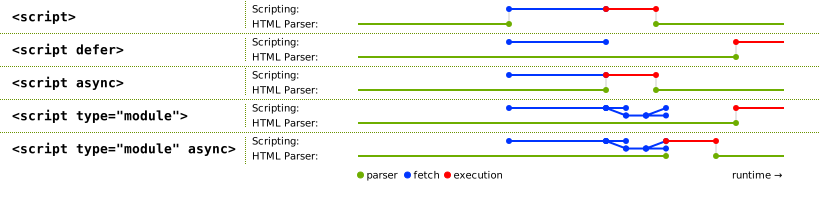
Comparison
ES6 vs CommonJS
| Features | ES Module | CommonJS |
|---|---|---|
| Loading style | Asynchronous | Synchronous |
| Exported with | Live binding | Cached value |
| Import hanlding | Live binding | Cached Value |
| Dependency Resolve Time | Build time | Runtime |
| Static Analysis | ⭕ | ❌ |
| Tree shaking | ❌ | ⭕ |
ES modules vs classic scripts
- ES module uses
import/exportsyntax, not available in classis scripts - ES modules have
strictmode enabled by default, while disabled in classic script modules have a lexical top-level scopethiswithin modules does not refer to the globalthisbut is undefined. (UseglobalThisto access the globalthis.)//script.js
var foo = 1;
console.log(window.foo); // 1
// module.mjs
var bar = 1;
console.log(window.foo); // undefined- ES module is deferred by default
Deep Dive
<script> vs <script type='module'>
Refer to this blog post.
Using JS modules in the browser
-
modulefetching is deferred by default, while classicscriptblocks html parsing<!-- type="module" indicates main.mjs is an ES6 module, and only recognized by browsers that support ESM. -->
<script type="module" src="main.mjs"></script>
<!-- script with nomodule flag is ignored by browsers supporting ESM, but handled by browsers don't. -->
<!-- add defer to avoid blocking html parsing -->
<script nomodule defer src="fallback.js"></script> -
modules are always evaluated only once, while classicscripts are evaluated whenever encountered.<!-- classic.js executes multiple times. -->
<script src="classic.js"></script>
<script src="classic.js"></script>
<!-- module.mjs executes only once. -->
<script type="module" src="module.mjs"></script>
<script type="module" src="module.mjs"></script>
<script type="module">import './module.mjs';</script> -
modules and their dependencies are fetched with CORS, meaning any cross-origin module scripts must be served with the proper headers, such asAccess-Control-Allow-Origin: *.
Why module must be specified explicitly with type='module'?
Great explanation here.
Export difference in ES6 and CJS
In short, ES6 modules exports objects through live binding while CJS modules exports cached values. Exporting binding in ES6 helps dealing with cyclic dependencies, refer to this blog post for in-depth explanation.
-
CommonJS exports cached value
//index.js
const foo = require("./foo");

console.log("Initial external value: ", foo.value); // Initial external value:  0

console.log("---Increment function call---");
foo.increment(); // Internal value: 1
console.log("External value: ", foo.value); // External value:  0

console.log("---Direct modification from external---");
foo.value += 1;
foo.printInternalValue(); // Internal value: 1
console.log("External value: ", foo.value); //External value:  1

//foo.js
let value = 0;

function increment() {
  value += 1;
  printInternalValue();
}

function printInternalValue() {
  console.log("Internal value:", value);
}

module.exports = { value, increment, printInternalValue }; -
ES6 exports binding
//index.js
import { value, increment, printInternalValue } from "./foo.mjs";

console.log("Initial external value: ", value); // Initial external value: 0

console.log("---Increment function call---");
increment(); // Internal value: 1
console.log("External value: ", value); // External value:  1

console.log("---Direct modification from external---");
value += 1; // TypeError: Assignment to constant variable.
printInternalValue();
console.log("External value: ", foo.value);

//foo.mjs
let value = 0;

function increment() {
  value += 1;
  printInternalValue();
}

function printInternalValue() {
  console.log("Internal value:", value);
}

export { value, increment, printInternalValue };
🔗 References
- JavaScript modules
- ES6 In Depth: Modules
- Adding JavaScript Modules to the Web Platform
- Modules, introduction -- javascript.info
- ES modules: A cartoon deep-dive -- Lin Clark
- ECMA262 -- Modules
- HTML Living Standards -- Module-related host hooks
- Top-level await